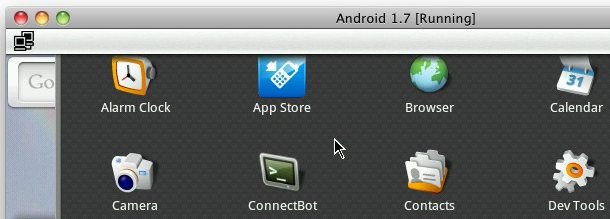
If you want to explore Android OS but you don’t have an Android phone, you can install Android OS directly into a virtual machine on your PC running either Mac OS X, Windows, or Linux. This process is pretty easy and it’s completely free, so if you’re interested in seeing what the biggest iPhone and iOS competitor is like, have a go.
Oh and before you ask, this tutorial is designed for Mac users but the process is identical in Windows and Linux too, so if you’re at work or you don’t have a Mac handy, you can follow along just the same. All of the download links are cross-platform compatible too.
How to run Android OS in a virtual machine
You’ll need to download a few things to get Android running atop your desktop OS, don’t worry it’s all free software:
- First you’ll need to download and install VirtualBox do that from here for Mac, Windows, or Linux
- Next you’ll want to download an Android Virtual Machine image, these are freely available for download here (these are specifically VirtualBox images)
- Uncompress the Android VM image file (Mac users can open 7z files with Unarchiver)
- Launch VirtualBox
- Select “Create New Virtual Machine”
- Select “Use existing hard disk” and click on the folder icon to select the Android VM file
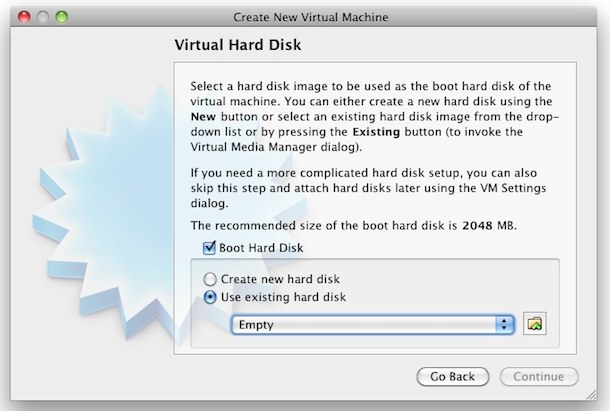
- Locate your Android VM file and select it with VirtualBox
- VirtualBox will now import the pre-made Android OS virtual machine image, you can allocate it however much RAM you want but a typical Android phone has somewhere between 128MB and 512MB, I chose 256MB of RAM for my image
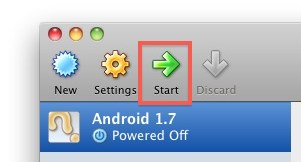
- To launch Android, simply select the image from the sidebar of VirtualBox and then click on the “Start” button at the top of the window
You’ll see some command line stuff fly by which is expected since Android is running atop Linux (kind of like how Mac OS X runs on a BSD base and iOS runs on a Mac OS X base). Let Android boot and soon you’ll see the Android desktop, VirtualBox will capture your mouse and keyboard (use left Command key on a Mac to escape) and you’ll be able to play around with Google’s mobile operating system.

This specific tutorial runs Android 1.7 but if you look around you can find newer Android virtual machines available. Now if you’re having fun with Android you can go a step further and dual boot Android OS and iOS on iPhone 3G and 2g models. If you choose to install Android onto your iPhone, you will need to jailbreak your iPhone first, and note that some features don’t work, which makes it more of a fun hack than a practical operating system replacement.

No comments:
Post a Comment